
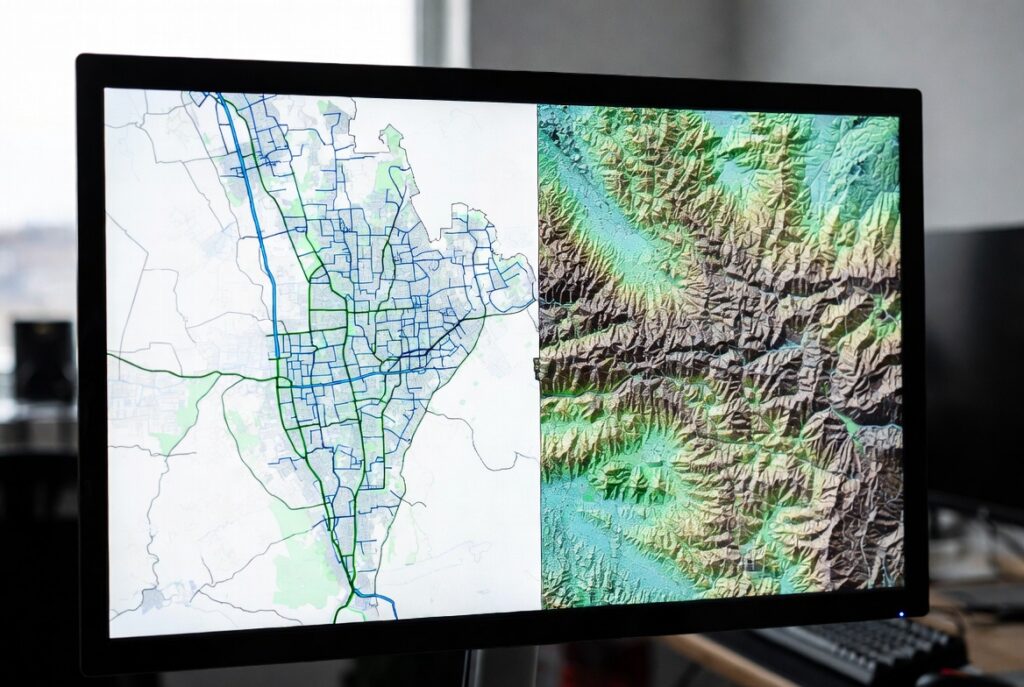
If you’ve ever opened a digital map and wondered how it knows where roads curve, rivers flow, or elevation changes, the answer lies in GIS data types. At Spectrum GIS Solutions, we work with these foundational building blocks every day to turn raw location data into clear, actionable insights.
Whether you’re a planner mapping new parks, an environmental analyst tracking wetlands, or a logistics manager optimizing delivery routes, knowing the difference between vector and raster data is step one to mastering GIS.
Let’s break it down—simply, visually, and with real-world examples.
The Two Main GIS Data Types
| Data Type | Structure | Best For | File Examples |
|---|---|---|---|
| Vector | Points, Lines, Polygons | Discrete features with exact boundaries | .shp, .geojson, .kml |
| Raster | Grid of pixels (cells) | Continuous surfaces | .tif, .jpg, .png, .img |
Think of it this way:
- Vector = Drawing with shapes (like in Illustrator)
- Raster = Painting with pixels (like in Photoshop)
1. Vector Data: Precision with Points, Lines & Polygons
Vector data represents real-world features using geometric shapes with exact coordinates.
The Three Vector Primitives:
| Type | Example | Use Case |
|---|---|---|
| Point | A hospital, a bus stop, a tree | Locating specific assets |
| Line | A road, river, pipeline | Modeling networks or paths |
| Polygon | A lake, city boundary, farmland | Defining areas or zones |
Pros:
- High precision—even at extreme zoom
- Small file size for simple features
- Easy to edit and label
- Supports attribute tables (e.g., “Population: 45,000” for a city polygon)
Cons:
- Not ideal for gradual changes (like temperature or soil moisture)
Pro Tip from Spectrum GIS: Use vector data when you need legal boundaries, infrastructure networks, or editable features.
2. Raster Data: Pixels for Continuous Phenomena
Raster data divides the world into a grid of cells (pixels), where each cell holds a value.
Common Raster Examples:
| Data | Source | What It Shows |
|---|---|---|
| Satellite imagery | Landsat, Sentinel-2 | Land cover, urban growth |
| Digital Elevation Model (DEM) | LiDAR, SRTM | Terrain, slope, flood risk |
| Temperature map | Weather models | Heat distribution |
| Soil moisture grid | Remote sensors | Agricultural planning |
Pros:
- Perfect for gradients and surfaces
- Supports complex analysis (e.g., slope, aspect, viewshed)
- Integrates with AI/ML for image classification
Cons:
- File size grows fast with resolution
- Loses detail when zoomed in too far
- Harder to edit individual features
Pro Tip from Spectrum GIS: Use 10m or 30m resolution rasters for regional planning; go 1m or finer for site-level design.
Vector vs. Raster: A Side-by-Side Comparison
| Feature | Vector | Raster |
|---|---|---|
| Zoom Quality | Stays sharp | Gets pixelated |
| File Size | Smaller for simple maps | Larger, especially high-res |
| Editing | Easy (move a point) | Hard (edit pixels) |
| Analysis | Great for networks | Best for surfaces |
| Real-World Fit | Man-made features | Natural phenomena |
When to Use Which? Real-World Scenarios
| Project | Recommended Data Type | Why |
|---|---|---|
| City zoning map | Vector (polygons) | Precise legal boundaries |
| Flood risk modeling | Raster (DEM + rainfall grid) | Shows water flow across terrain |
| Utility network (water pipes) | Vector (lines + points) | Track connections and valves |
| Vegetation health monitoring | Raster (NDVI from satellite) | Continuous health index |
| Store location analysis | Both! | Vector for competitors, raster for population density |
At Spectrum GIS, we often combine both in layered analysis—vector roads over raster elevation—to deliver richer insights.
Tools to Work With GIS Data Types
| Task | Free Tool | Paid/Professional |
|---|---|---|
| View/Edit Vector | QGIS | ArcGIS Pro |
| Explore Rasters | Google Earth Engine | ENVI, ERDAS |
| Convert Between Types | QGIS (Rasterize/Vectorize) | FME, ArcToolbox |
Need help choosing or converting? Contact Spectrum GIS for a free data health check.
Final Takeaway: Start with the Right Data
Choosing the correct GIS data type isn’t just technical—it’s strategic. Use vector for precision and editability. Use raster for gradients and modeling. Use both for the full picture.
Your GIS journey starts with data. Master these types, and you’ll build maps that don’t just show the world—they explain it.
What’s your next mapping challenge? Drop a comment below—need help picking data for a project? We’re here to guide you.
Next up: “How to Convert Between Vector and Raster (Without Losing Your Mind)” Subscribe to the Spectrum GIS blog to never miss a post!
